
✨ Highlights
Picking operators now see how many bins a series needs before they start it. A position can be marked Damaged directly on the PDA (Portable Data Assistant). Orders waiting for stock can also receive a new shipping label automatically when theirs expires.
A Summary Before Every Picking Series
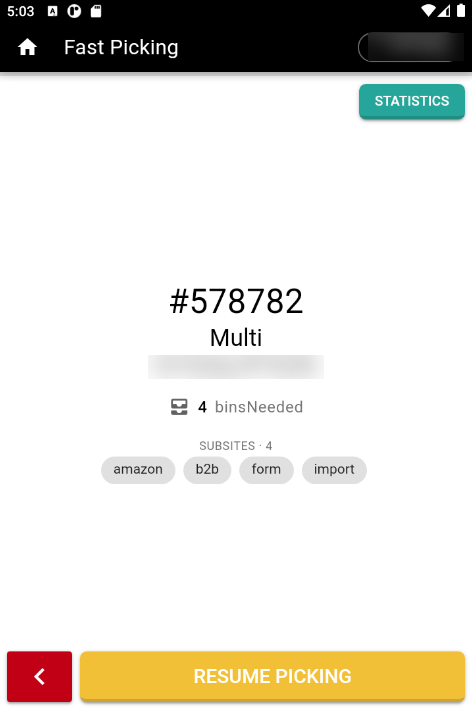
A picking operator can now review what a picking series involves before starting it. The start screen shows the number of bins the series requires and the Subsites it covers, along with the series number, its type and its location in the warehouse. With the bin count available in advance, a picking operator can collect the correct number at the start rather than returning for more. Fast Picking (fast-picking mode) and standard picking both open on this screen.
Damaged Positions on the PDA
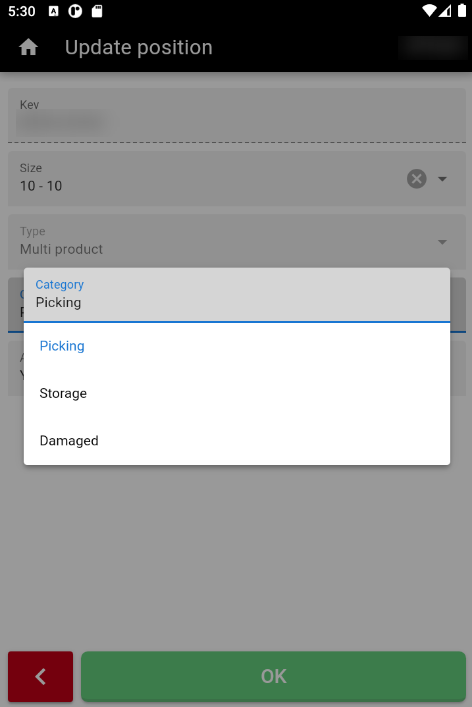
An operator who finds damaged goods can now mark the position as Damaged on the handheld, rather than recording it and correcting it in the back office later. Damaged is available alongside Picking and Storage when changing a position's category. The category is also displayed on the position screen and in the position list, so the next operator to scan that position sees it.
Waiting Orders Get a New Label Automatically
An order waiting for stock can now receive a new shipping label automatically when its current label expires, without someone having to request it. Enable Auto-refresh waiting orders in the WMS settings and the WMS does this once a day: it requests a new label for each affected order and downloads that order's documents again. A label is valid for 30 days unless the carrier sets its own expiry date. Documents retrieved from a web address are refreshed; files uploaded manually are not.
🚀 Features
WMS
- Auto-refresh waiting orders is disabled until you enable it; it applies to orders still waiting for stock or ready to be picked, and processes up to 300 orders a day.
PDA
- The start screen identifies an Assembler (a series that bulk-collects identical products, then assembles the orders afterward) series and a homogeneous series (the same product throughout), so a picking operator can distinguish them immediately.
- A position's category is now displayed in the operator's own language, on the position screen and in the position list.
🐛 Bug Fixes
- Saving the site used to re-attach any carrier used on an order there in the last 6 months, which returned carriers that had been removed deliberately; a carrier removed from a site is no longer restored automatically.
- An order with more than one line of the same product was counted twice, and excluding several products at once did not exclude all of them; generating a picking series filtered by product now selects the correct orders.
❤️ Thank You
Thank you for being part of the v2026.09.22.1 release of OSIRIS WMS.
With this update, we continue refining the platform, addressing real operational needs, improving stability, and making the day-to-day experience better across all teams.
We appreciate your trust and remain dedicated to building a system that grows alongside your business.