
✨ Highlights
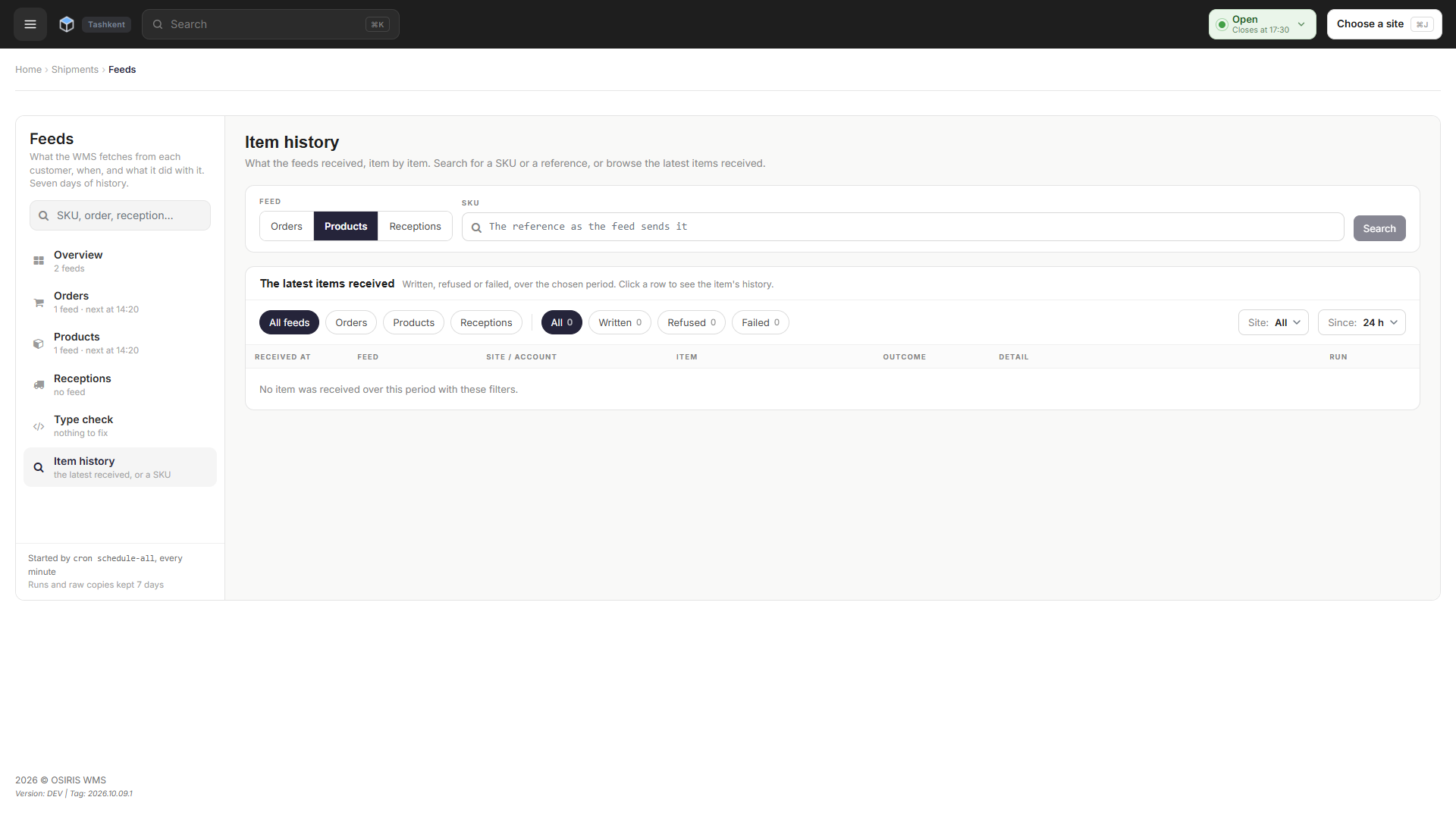
A failed feed run now says what actually went wrong and opens help on how to fix it. Feeds by site can be searched and filtered, and Item history lists the latest items received. A product renamed to an SKU (Stock Keeping Unit) that another product already uses can now be resolved from the Feeds page, instead of being refused at every run.
Failed Feed Runs Now Explain What Went Wrong
When a feed run fails, the Feeds page now tells you why: the feed's server took too long to answer, sent back an error, could not be found, refused or cut the connection, could not be reached at all, or presented a security certificate that is untrusted, has changed, has expired or belongs to another address. Until now, every connection failure read No answer within 30 s, whatever the real cause. A What to do? link next to every failure explains what happened, what the feed must change to work again and whether the failure counts toward the automatic pause, with a link to the matching part of the documentation; customer accounts see wording written for them. For a refused certificate, the help tells you to read your browser's warning and not to continue to the site.
Find Feeds and Recent Items Faster
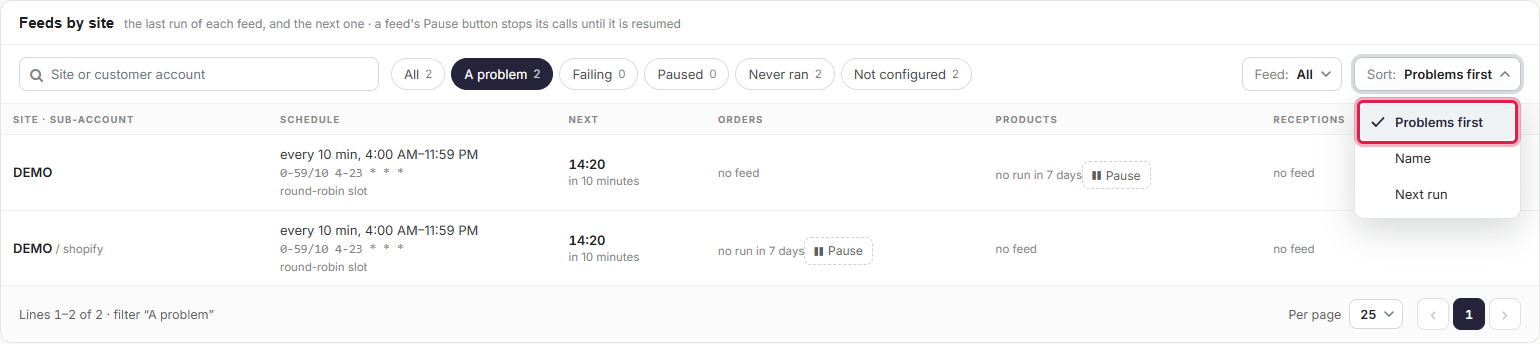
You can now search Feeds by site, filter it by state or by feed, sort it and move through it page by page, and on a phone each site shows as a card. Item history now lists the latest items received, filtered by feed, outcome, site and period, so you can see what arrived without first searching for one item. On large screens, the Feeds, WMS Configuration and Maintenance pages now widen up to 1600 px to use the extra space.
Fix Duplicate SKUs From the Feeds Page
You can now resolve a products feed conflict where a customer's product was renamed to an SKU that another product already uses. Until now, the WMS refused that product at every run until someone corrected it by hand. The warehouse resolves the conflict with Resolve… on the Feeds page, and a customer account does it with Fix…, using its own product references and SKUs.
🚀 Features
WMS
- A feed's server must now accept the connection within 10 seconds, or the run fails with No connection to the server within 10 s.
- An address that cannot be found, a refused connection and no connection within 10 seconds no longer count toward a feed's automatic pause.
- A failure that happens when no feed has had an answer for 15 minutes does not count toward the pause, because the problem is then most likely on the WMS side; the Feeds page now shows it as Does not count toward the pause instead of as counted.
- Clicking a square of the Feeds timeline now opens the runs behind it, the timeline goes back over every day the page keeps, and each square now matches how often the feeds run.
- Longer drop-down lists on the Feeds page, in WMS Configuration and in Maintenance > Site data deletion now have a search, and the Runs table now takes one period instead of two separate dates.
- The A problem count in Feeds by site no longer includes feeds that someone paused by hand.
- A super admin can now create a camera from the Cameras page by entering its name, IP (Internet Protocol) address, login details and template; a name another camera already uses is refused, deleting a camera now asks for confirmation, and the camera page checks its fields the same way as the create form.
- The Type check on the Feeds page now keeps a field sent in the wrong type listed for 7 days after it was last detected, with First seen and Last seen dates, and grays out fields that are no longer sent that way.
- Feeds, WMS Configuration and Maintenance now show their messages at the bottom of the screen: success messages close after 5 seconds, and errors stay until you close them.
🐛 Bug Fixes
- Calculating a transport invoice template took up to about four minutes; it now takes seconds and gives the same counts.
- Switching language no longer loses your place: you return to the same page in the same state (on the Feeds page, the same section, run and filters), and never to a page outside the WMS.
- Time filters in back office lists left out the last minute of the end date and time; that minute is now included.
- Item history said over the last 7 days while its list opened on 24 hours; its hint now matches the chosen period.
❤️ Thank You
Thank you for being part of the v2026.10.07.1 release of OSIRIS WMS.
With this update, we continue refining the platform, addressing real operational needs, improving stability, and making the day-to-day experience better across all teams.
We appreciate your trust and remain dedicated to building a system that grows alongside your business.